

LED Menu Board Adjustable Paper | Changeable Backlit Menu for Cafés & Bakeries
LED Menu Board Adjustable Paper | Changeable Backlit Menu for Cafés & Bakeries
We will contact you by WhatsApp or call after you place order for design approval before production.
Couldn't load pickup availability
When customers walk up to a bakery or café counter, they should be able to understand the menu without having to ask about every item.
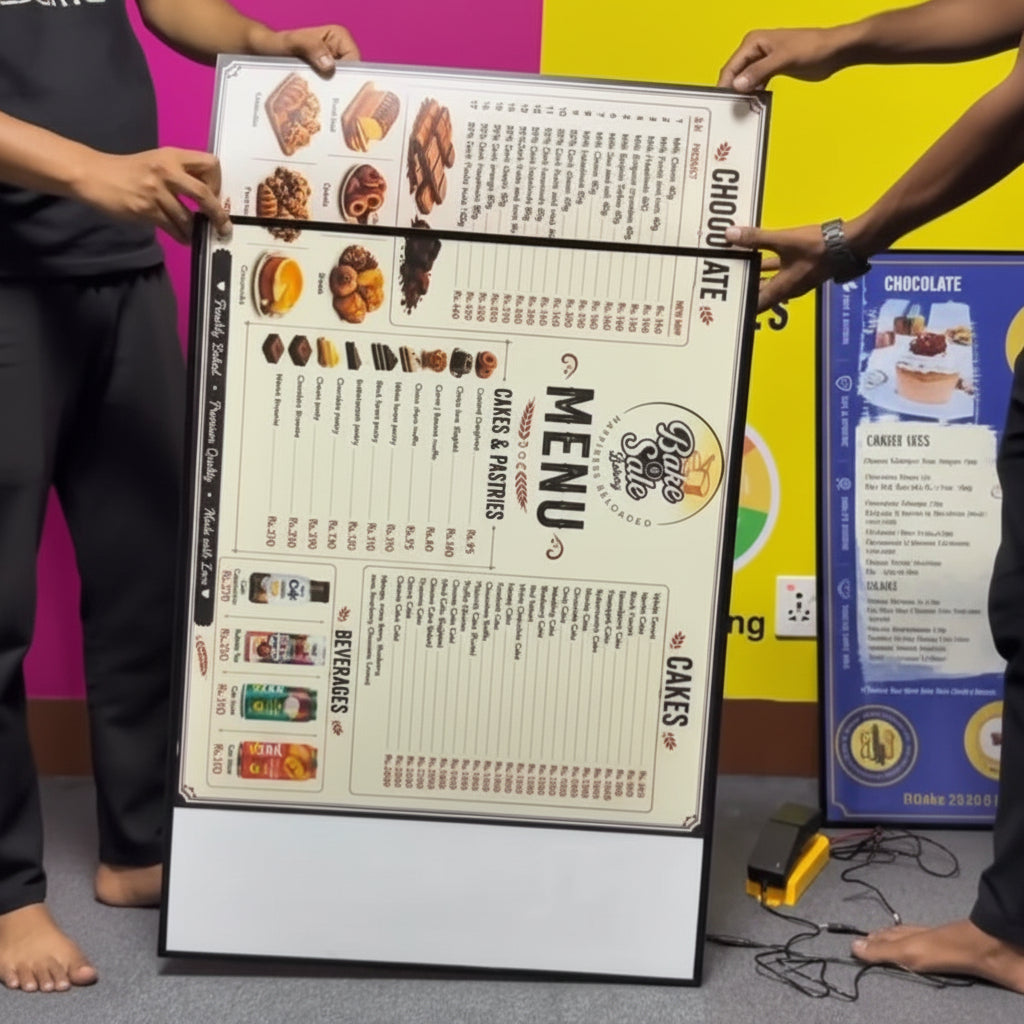
The LED Menu Board Adjustable Paper is designed to make that process simpler. The example shown is a large landscape-format illuminated menu displaying chocolates, cakes, pastries and beverages, with product names, prices and photographs arranged into clearly separated sections.
The important advantage is that the display is designed around a changeable paper/printed menu format. When prices change, new products are introduced or a seasonal menu is launched, the visible menu can be updated instead of replacing the entire illuminated display.
This makes it a practical solution for bakeries, cafés, restaurants, dessert shops, food counters and other businesses where the menu is regularly changing.
A Menu Customers Can See Clearly
A menu positioned behind or near the counter needs to be visible before the customer reaches the cashier.
The large illuminated surface gives the menu a strong presence and provides enough room to organize multiple categories.
In the example, customers can see separate sections for:
- Chocolate
- Cakes
- Cakes & pastries
- Beverages
- Product images
- Prices
This type of organization helps customers scan the menu rather than reading it line by line.
Changeable Paper Makes the Display Practical
Menus are not permanent.
A bakery may add a new pastry. A café may change its beverage prices. A restaurant may introduce a seasonal special. A dessert shop may discontinue an item.
With an adjustable paper LED menu board, the physical illuminated display can remain in place while the visible menu artwork is updated when necessary.
That makes the display particularly useful for businesses with frequently changing menus.
Bright LED Backlit Menu Display
The menu is presented on an illuminated surface rather than an ordinary unlit poster.
LED lighting behind the display helps the menu remain prominent within the surrounding interior.
This is useful for:
- Bakery counters
- Café ordering areas
- Restaurant counters
- Dessert stores
- Food courts
- Takeaway outlets
The actual brightness and colour appearance depend on the LED system, display construction, printed material and ambient lighting.
Large Landscape Menu Format
The landscape format shown here is particularly useful when a business has several menu categories that need to sit alongside one another.
The width allows the artwork to be divided into columns or sections.
For example:
CHOCOLATES | CAKES | PASTRIES | BEVERAGES
This can make a relatively large menu much easier to navigate.
Perfect for Bakeries
Bakeries often have a wide variety of products, and many of them need both a name and price.
A bakery menu board can be used for:
- Cakes
- Pastries
- Cookies
- Chocolates
- Desserts
- Breads
- Beverages
- Special products
Product photographs can be included wherever they help customers understand the offering.
Ideal for Cafés
Cafés can use an illuminated menu to display:
- Coffee
- Tea
- Cold beverages
- Snacks
- Desserts
- Breakfast items
- Combos
- Seasonal drinks
The menu can be structured according to the café's actual product range.
Useful for Restaurants
Restaurants can also use the same display concept for selected menu sections.
For example:
Starters
Main Course
Desserts
Beverages
Special Offers
For larger menus, multiple boards can be used so that customers are not presented with an overcrowded single display.
Product Photographs Make the Menu More Visual
The example uses small photographs alongside the product names.
This is particularly effective for food businesses because customers often make decisions based on appearance.
Photographs can be used to highlight:
- Signature cakes
- Bestselling pastries
- Featured desserts
- Popular beverages
- New products
- Special combos
The artwork should maintain a good balance between photographs and readable information.
Make Prices Easy to Find
A customer should not have to search through a complicated menu to find the price.
The example uses a structured price column beside the product names.
This can be adapted according to the business's preferred menu format.
Clear pricing is particularly important when the board is viewed from several metres away.
Organize a Large Menu Into Sections
The more products a business offers, the more important menu organization becomes.
Instead of presenting everything as one long list, categories can be visually separated.
For example:
CAKES & PASTRIES
Product
Price
CHOCOLATES
Product
Price
BEVERAGES
Product
Price
This makes the menu much easier to scan.
Use Your Own Menu and Branding
The board can be designed around your actual business.
You can provide:
- Logo
- Menu list
- Product names
- Prices
- Food photographs
- Brand colours
- Promotional messages
- Special offers
The artwork can then be prepared to suit the selected display size.
Ideal for a Bakery Counter
The counter is where customers make their final ordering decisions.
Placing the illuminated menu where customers naturally look gives them a clear reference point before they order.
It can also reduce the need for several smaller price cards or temporary printed sheets around the counter.
Keep the Counter Looking Organized
A professionally designed menu board can bring the primary product information into one location.
Instead of having different printed price lists, promotional sheets and handwritten notices spread around the counter, the main menu can remain visually consistent.
This can contribute to a cleaner customer-facing environment.
Use for Changing Product Prices
Food businesses regularly deal with changing ingredient costs and menu prices.
A changeable menu format is useful in this situation because the visible artwork can be refreshed when required.
The physical illuminated structure remains useful even as the menu evolves.
Promote New Products
The board can also be used to introduce new items.
For example:
NEW CAKE COLLECTION
with photographs, names and prices.
A new product can be given more visual space than the regular menu items to attract attention.
Highlight Bestsellers
A bakery or café can use photographs and layout hierarchy to draw attention to popular products.
Sections such as:
BESTSELLER
CHEF'S SPECIAL
CUSTOMER FAVOURITE
NEW
can be incorporated where appropriate.
This gives the menu an additional merchandising role.
Use for Seasonal Menus
A changeable menu board is especially useful during seasonal periods.
A bakery may introduce:
- Festive cakes
- Special pastries
- Seasonal desserts
- Gift boxes
- Celebration products
The artwork can be changed to reflect the current range.
Ideal for Food Court Outlets
Food court businesses need customers to understand their menu quickly.
A large illuminated board positioned above or behind the counter can provide the necessary information in a format that is visible within the ordering area.
The landscape format can work particularly well where the counter has a wide wall behind it.
Use Multiple Menu Boards
If the menu is extensive, several illuminated boards can be used together.
For example:
Board 1: Cakes & Pastries
Board 2: Chocolates & Desserts
Board 3: Beverages
Board 4: Combos & Offers
This can improve readability while maintaining a consistent visual appearance.
Combine Menu and Promotion
A menu board does not have to be purely informational.
A section can be dedicated to promotions such as:
Today's Special
Combo Offer
New Arrival
Festive Special
Limited Time Offer
This allows the same display to support both ordering and promotion.
Make the Menu Easy to Scan
Customers rarely study a menu from top to bottom.
They generally look for the category they want, find a few products and compare the prices.
For this reason, the artwork should use clear headings, sensible spacing and a readable type size.
The illuminated display provides the canvas; the quality of the menu design determines how effectively customers can use it.
Suitable for Chocolate Shops
Chocolate retailers can use the display to present:
- Chocolate bars
- Gift boxes
- Assorted chocolates
- Truffles
- Seasonal collections
- Special offers
Product photography can be especially effective for visually appealing chocolate products.
Suitable for Dessert Stores
Dessert businesses can use an illuminated menu to showcase:
- Cakes
- Pastries
- Donuts
- Cookies
- Puddings
- Ice cream
- Beverages
The artwork can be designed around the exact products and pricing structure.
Suitable for Takeaway Counters
A large menu positioned behind a takeaway counter allows customers to review the options while waiting.
This can make the ordering process more straightforward and give the business a dedicated location for communicating its complete offering.
Custom Menu Layout
There is no single layout that works for every food business.
A bakery with 40 products needs a different layout from a café with 15 drinks.
The artwork can therefore be designed around:
- Number of products
- Number of categories
- Product photographs
- Price information
- Viewing distance
- Display dimensions
Choose Landscape or Other Formats
The landscape orientation shown is particularly useful for wide counters.
Depending on the available wall space, other proportions can be considered.
The important point is that the artwork should be designed for the final physical format rather than simply stretched into it.
Use High-Quality Food Photography
Because the display is illuminated and relatively large, photographs should ideally be high resolution.
Good food photography can help products look more appealing and can make it easier for customers to identify what they want.
For best results, the photographs should be prepared specifically for the final display dimensions.
Suitable for Premium Bakeries
A professionally designed illuminated menu can complement a premium bakery interior.
The example combines a clean white menu background, product photographs, organized pricing and branded presentation.
The same principle can be adapted to match a bakery's own interior and brand identity.
Suitable for Modern Cafés
Modern cafés often use their menu as part of the overall visual identity.
A clean illuminated menu can work alongside:
- Interior signage
- Wall graphics
- Counter branding
- Product displays
- Decorative lighting
The result can feel more cohesive than using unrelated printed menu sheets.
Change the Menu Without Changing the Display
This is the central advantage of the product.
The business can keep the illuminated board as part of the interior while updating the visible menu artwork as products and prices change.
For a business that expects to use the same menu area for years, this flexibility can be particularly valuable.
Useful for Promotional Campaigns
The same display can be adapted for promotional campaigns.
For example:
20% OFF SELECTED ITEMS
or
FESTIVE SPECIALS
can replace or supplement the regular menu artwork for a limited period.
Once the promotion ends, the regular menu can be restored.
Make Your Signature Products More Prominent
If a bakery has a signature cake or a café has a bestselling drink, the artwork can give it a more prominent position.
A larger photograph, highlighted section or featured-product area can draw customer attention.
Create a Consistent Menu Across Outlets
Businesses with multiple branches can use the same menu design language across different locations.
The individual boards can then be updated with:
- Local prices
- Local products
- Outlet-specific offers
- Seasonal items
This maintains consistency while allowing each location some flexibility.
Practical for Regular Menu Updates
A changeable paper format makes the display particularly relevant to businesses where updates are part of normal operations.
Instead of thinking of the menu as a permanent printed sign, it becomes a reusable display system.
Consider Viewing Distance
The amount of information that should be placed on the board depends heavily on where customers will stand.
A board viewed from several metres away needs larger text and simpler information than a small menu placed directly on a counter.
The artwork should be designed accordingly.
Balance Brightness and Readability
The LED illumination should support the printed artwork rather than overpower it.
The appropriate LED brightness depends on the surrounding lighting conditions and display size.
The goal is a menu that is clearly visible while maintaining comfortable viewing.
Professional Menu Display by The Seven Colours
The Seven Colours can create custom LED menu boards with adjustable/changeable paper displays for bakeries, cafés, restaurants, dessert stores, chocolate shops and food counters.
Your own menu, prices, product photographs, logo, promotional offers and branding can be incorporated into the artwork.
Whether you need one large landscape menu board or a coordinated set of illuminated displays, the focus should remain on making the information easy to see, easy to scan and easy for customers to order from.
FAQs
Q1. What is an LED Menu Board Adjustable Paper?
It is an illuminated menu display designed with a changeable paper or printed graphic format, allowing businesses to update their menu artwork when required.
Q2. Can the menu be changed when prices or products change?
Yes. The changeable format is intended for businesses that regularly update products, prices, promotions or seasonal offerings.
Q3. Is this LED menu board suitable for bakeries?
Yes. It is particularly useful for displaying cakes, pastries, chocolates, beverages, desserts and other bakery products.
Q4. Can product photographs be included?
Yes. Food photographs can be combined with product names, prices, descriptions and promotional information.
Q5. Can I add my bakery or café logo?
Yes. Your logo, brand colours, typography and other branding elements can be incorporated into the menu artwork.
Q6. Can the board display several menu categories?
Yes. The large landscape format is well suited to organizing several categories such as cakes, pastries, chocolates and beverages.
Product Features
Product Features
Materials and care
Materials and care
Merchandising tips
Merchandising tips